Troubleshooting: Federation for Windows Intune
During a Windows Intune proof of concept (PoC) I was facing some issues configuring federation in order to enable Signle Sign On (SSO).
Proxy Authentication
When configuring federation we couldn’t convert the the default domain to a federated domain type. By using the –Verbose –Debug parameters of convert –MsolDomainToFederated cmdlet the root cause became clear. Proxy Authentication was required and therefore we couldn’t convert the domain. One down two to go!
![clip_image001_thumb[3]](https://ronnydejong.com/wp-content/uploads/2014/07/clip_image001_thumb31.png "clip_image001_thumb[3]")
convert –MsolDomainToFederated – DomainName mydomain.com –Verbose –Debug
![image_thumb[2]](https://ronnydejong.com/wp-content/uploads/2014/07/image_thumb2.png "image_thumb[2]")
Whitelist URL’s
After granting the system internet access through proxy we validated in our internet connectivity which was working fine however we encounterd another issue as the relying party trust couldn’t be configured as part of the domain conversion. After checking the proxy logfiles we noticed that some url’s were blocked. Based on this, two urls should be whitelisted in order to configure federation properly:
- *.microsoftonline.com
- nexus.microsoftonline-p.com
So two down one to go…
Use different namespace identity
Two things to keep in mind when converting a domain! User must be member of Windows Intune Global Administrator role in order to convert a Windows Intune domain (namespace) for federation. You can’t be logged in with a user account of the same domain you want convert. We used the initial global administrator user which is not member of the inovativ-cloud.nl namespace in order to convert the inovativ-cloud.nl domain to a federated domain.

Set up Federation between AD FS and Microsoft Azure Active Directory/Office365/Windows Intune
| 1. Import MSOnline PowerShell CMDlet | import-module MSOnline |
| 2. Connect to Windows Azure AD | Connect-MsolService –Credential $cred |
| 3. Get Domain | Get-MsolFederationProperty -DomainName mydomain.com |
| 4. Add Domain | New-MsolFederatedDomain –DomainName mydomain.com |
| 5. Convert Domain | Convert-MsolDomainToFederated –DomainName mydomain.com |
User Get-MsolFederationProperty –DomainName yourdomain.com to validate of your domain is succesfully converted and known as federated domain by Azure Active Directory.
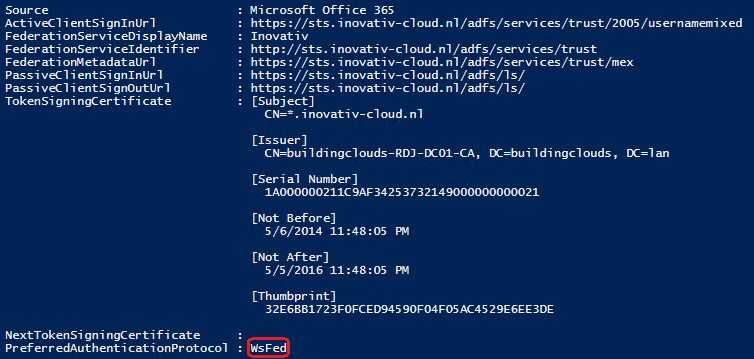
If you open the Active Directory Federation Service console under Relying Party Trusts Microsoft Office 365 Indentity Platform has been added based on the domain conversion to a federated domain.

Categories
 Modern Workplace